

What Is Salesforce Staff Augmentation? A Complete Guide to Costs, Models, and Roles in 2026
02 Jun 2026
Table of Contents
Your Salesforce backlog is growing. Hiring is frozen. The deadline isn’t moving.
That’s the scenario a lot of Salesforce admins and IT managers are living in right now – not because their orgs are failing, but because demand keeps outpacing what a fixed internal team can realistically deliver. And honestly, the problem isn’t skill gaps. It’s capacity.
Salesforce staff augmentation is how companies close that gap – not by outsourcing their entire Salesforce operation, not by going through a months-long hiring process, but by pulling in certified professionals on demand, exactly when and where the work needs to happen. If you’ve been trying to figure out whether this model fits your situation, 360 Degree Cloud’s Salesforce staff augmentation services are worth looking at before you read further.

Table of Contents
What Is Salesforce Staff Augmentation?
In plain terms, it’s the practice of bringing certified Salesforce professionals – developers, admins, architects, consultants – into your team without putting them on payroll. They work under your direction, inside your Salesforce org, alongside your existing people. That’s the distinction that matters most.
It’s not outsourcing. When you outsource, you hand a deliverable to a vendor, and they figure out how to get it done. With staff augmentation, you’re still running the show. The augmented resource executes, but the direction, the decisions, the access control – that’s yours.
It’s also not managed services. Managed services run a defined scope autonomously. Staff augmentation fills a seat on your team, not a contract line item on a statement of work.
And it’s definitely not hiring. Hiring a mid-level Salesforce developer in the US takes 3–6 months and costs upwards of $120,000 a year before benefits. Staff augmentation can get someone productive inside your org in two weeks, with no long-term commitment attached.
How Salesforce Staff Augmentation Actually Works
The process isn’t complicated. That’s one of the things that surprises people.
You define the role – specific skills, Salesforce cloud, duration, expected hours per week. A good partner takes that brief and comes back with pre-vetted, certified candidates, typically within 7–14 days. You interview, you select, and onboarding starts.
From there, the resource joins your team through the same channels your internal team uses – Slack, Jira, whatever project management setup you’re running – and gets org access scoped to what they actually need.
Work runs sprint-based or deliverable-based, depending on what fits your operation. And when the engagement scope shifts – which it always does – you ramp up or pull back without renegotiating a full contract.
That flexibility is the whole point.
Why Salesforce Teams Are Leaning on This in 2026
Here’s the thing: Salesforce isn’t a static platform anymore (it never really was, but it’s especially true now). Three major releases a year – Spring, Summer, Winter – mean constant pressure to adopt new features, deprecate old ones, and keep configurations aligned with where the platform is heading.
Agentforce rollouts are the clearest example right now. AI automation built on Salesforce’s native architecture requires a specialization most internal teams simply haven’t had time to build. You can’t hire for it fast enough, and you can’t train for it mid-sprint.
That’s the gap staff augmentation fills. In practice, teams aren’t using it because their internal people are weak. They’re using it because the platform moves faster than headcount does.
There’s also the budget reality. Hiring triggers HR processes, compensation reviews, benefits packages. Augmentation is a line item in services spend – simpler to approve, simpler to stop.

What Salesforce Staff Augmentation Actually Costs in 2026
This is where most guides go vague. Worth saying: the cost range is wide, and what you pay depends heavily on where the resource is based, what role you need, and how long the engagement runs.
Here’s a straight breakdown:
| Geography | Hourly Rate | Monthly Equivalent |
| Offshore (India) | $40–$80/hr | $6,500–$12,000 |
| Nearshore (LATAM) | $70–$120/hr | $11,000–$18,000 |
| Onshore (US) | $120–$200/hr | $20,000–$35,000 |
Nearshore Salesforce staff augmentation has picked up traction specifically because of the timezone overlap – teams in LATAM can work synchronous hours with US-based counterparts in a way offshore teams sometimes can’t.
Role seniority shifts the number significantly. An offshore Salesforce Admin sits at the lower end of that range. An offshore Salesforce Architect with Data Cloud experience sits at the top – or beyond it.
For a typical Salesforce staff augmentation project – say, a Service Cloud implementation or a CPQ buildout – expect total engagement costs somewhere between $15,000 and $50,000, depending on scope and duration.
Now put that against hiring. A US-based Salesforce developer earns $120,000–$160,000 per year before benefits and recruiting fees. At $80/hr, an offshore augmentation resource runs roughly $133,000 annually in equivalent terms – but you can end that engagement with 30 days’ notice. No severance. No transition period. No headcount on the books.
That math is usually what closes the conversation.
Salesforce Staff Augmentation Engagement Models Explained
There are three main structures, and the right one depends on what you’re actually trying to get done.
Time and Materials is the most direct – you pay per hour for specific deliverables. Good for clearing a backlog or handling a defined project phase. No monthly commitment, no rolling scope.
Monthly Retainer is better for ongoing Salesforce staffing and augmentation services for ongoing enhancements – keeping a resource engaged for a fixed number of hours per month. It works when you have steady Salesforce work but not enough to justify a full-time hire. Genuinely the most common model for teams in a maintenance-and-enhancement cycle.
Project-Based is fixed scope, fixed price. Best when the work is well-defined and the requirements won’t shift mid-stream. Riskier if your org has a history of scope creep.
A fourth variant – sometimes called the nearshore model – involves a dedicated offshore team built to overlap with your timezone. That’s closer to a hybrid between retainer and managed delivery, and it’s increasingly common for teams running multi-sprint roadmaps.
What Roles Can You Augment?
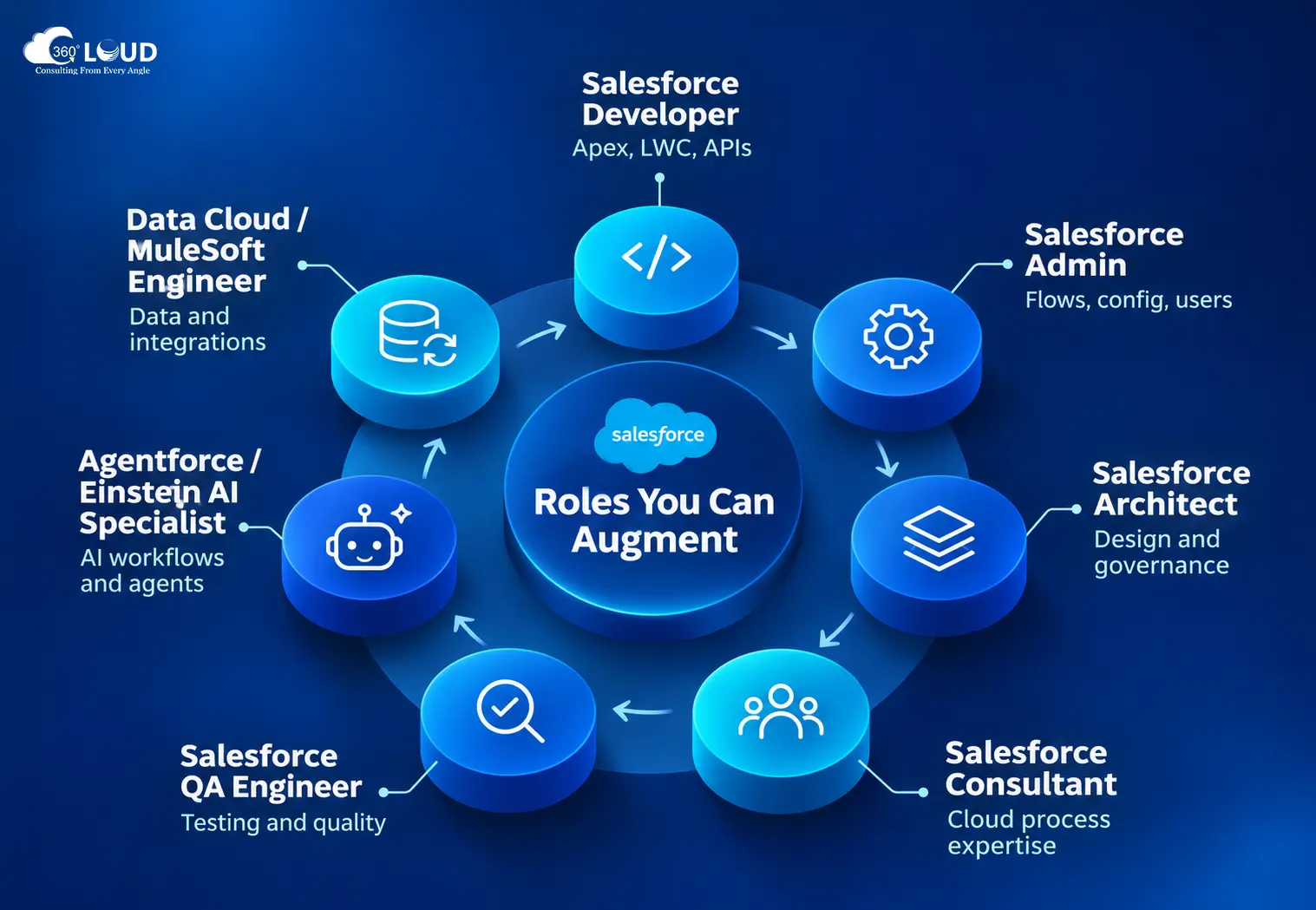
Most of the common Salesforce resource augmentation model conversations center around developers and admins – but the range is broader than that.
- Salesforce Developer – Apex, LWC, API integrations. The highest-demand role in augmentation.
- Salesforce Admin – configuration, Flows, user management, day-to-day org operations.
- Salesforce Architect – solution design, org strategy, technical governance. Expensive onshore, far more accessible offshore.
- Salesforce Consultant – Sales Cloud, Service Cloud, Marketing Cloud, Revenue Cloud. Functional expertise without full-time overhead.
- Salesforce QA Engineer – often skipped by teams that then regret it.
- Agentforce / Einstein AI Specialist – the role everyone suddenly needs in 2026.
- Data Cloud / MuleSoft Engineer – integration-heavy work that most internal teams don’t have bandwidth for.
Worth saying: a lot of teams augment a single role to start, realize the model works, and expand from there. It’s not an all-or-nothing decision.
Wrapping Up
Salesforce team augmentation isn’t a workaround. For a lot of organizations, it’s just the more rational structure – especially when the alternative is a six-month hire for work that might take eight months to complete.
The cost clarity is there if you ask for it. The engagement models are well-established. And the roles available cover everything from admin-level configuration to AI specialist work that most internal teams are still figuring out.

Categories

Solve It with Salesforce. We’ll Show You How.
AI. Apps. Experts. Everything you need to win with Salesforce under one roof.Frequently Asked Questions
How do I onboard an augmented Salesforce developer into my internal team effectively?
It depends on how structured your existing processes are. Teams with documented sprint workflows, clear Jira boards, and defined org access protocols get augmented resources productive faster - usually within the first week. If those things don’t exist, the onboarding gap isn’t a staff augmentation problem. It’s a documentation problem you’d hit with any new hire, too. At minimum: assign an internal point of contact, scope org access before day one, and do a 30-minute sync on communication norms. That’s usually enough.
What SLA or quality standards should I expect from a Salesforce staff augmentation partner?
A reputable partner should commit to response times, bug fix turnaround, and code review standards in writing before the engagement starts. In practice, what matters more than the SLA document is whether the partner has a bench of pre-vetted, certified resources - not a network of contractors they’re sourcing reactively. Ask them directly: how were these people vetted? What certifications do they hold? How quickly can you replace a resource if the fit isn’t right?
What is the difference between a Salesforce staff augmentation company and a Salesforce staffing agency?
A staffing agency finds you a person. A staff augmentation company takes responsibility for the quality of that person’s work. That’s actually two very different things dressed in similar language. With a true staff augmentation partner, there’s accountability for delivery - not just placement. You’re not screening resumes from a job board. You’re getting a resource who’s already been qualified for Salesforce work specifically.
How do I end a Salesforce staff augmentation engagement without disrupting my project?
Wind-down planning should start before you think you need it. Build a knowledge transfer protocol into the engagement from the beginning - documentation, handover notes, recorded walkthroughs. Most engagements run 30-day notice terms. That’s enough time if you’ve kept internal visibility on what the resource was building. It’s not enough if the work lived only in their head.
Can I convert an augmented Salesforce resource to a full-time employee after the engagement?
Most partners allow it. There’s usually a conversion fee or a minimum engagement length before conversion becomes available. Worth clarifying upfront - if full-time hiring is a possible outcome, you want that pathway written into the agreement, not negotiated after you’ve already decided you want to keep someone.
What happens if an augmented Salesforce developer doesn’t meet quality expectations?
A good partner replaces them. That’s the short answer. The longer answer: document the issue clearly, communicate it early, and push for a defined replacement timeline in writing. Teams that wait too long to flag performance issues end up absorbing lost sprint capacity that’s hard to recover. Flag early. Most partners respond faster when the concern is specific - “the LWC component has three unresolved bugs after two review cycles” lands differently than “the work quality isn’t great.
Can augmented Salesforce resources handle change management alongside technical delivery?
They can support it - user documentation, training materials, UAT coordination - but change management ownership should stay internal. Genuinely. An augmented resource doesn’t have the organizational context to drive adoption across your business units. They can build the tools; you need someone internal to drive the rollout.
What documentation should I receive at the end of a Salesforce staff augmentation engagement?
At minimum: technical specs for anything custom-built, Flow documentation, any changes to data models or permission sets, and a summary of open items. If the engagement involved integration work, API documentation is non-negotiable. Don’t wait until the engagement ends to ask for this - request documentation checkpoints at the mid-point of the project, not just at the close.

About the author
Editorial TeamThe Editorial Team at 360 Degree Cloud brings together seasoned marketers, Salesforce specialists, and technology writers who are passionate about simplifying complex ideas into meaningful insights. With deep expertise in Salesforce solutions, B2B SaaS, and digital transformation, the team curates thought leadership content, industry trends, and practical guides that help businesses navigate growth with clarity and confidence. Every piece we publish reflects our commitment to delivering value, fostering innovation, and connecting readers with the evolving Salesforce ecosystem.
Recent Blogs
 Uncategorized
How to Create a Salesforce Roadmap That Aligns CRM With Business Growth?
Most Salesforce orgs don’t fail on day one. They drift. A new field here, a quick automation there, one more integration because sales asked nicely.…
Read More Uncategorized
Don’t Close 2026 Without This Year-End Salesforce Audit
Picture the first week back after the holidays. Everyone’s still settling in, and nobody’s really working yet. Then a message lands from leadership: they need…
Read More Marketing Cloud
Salesforce Agrees to Acquire Braze: What It Means for Marketing Cloud
Salesforce Acquires Braze for $5.66 Billion – What It Means for Marketing Cloud
Read MoreReady to Make the Most Out of Your Salesforce Instance?
Our Salesforce aces would be happy to help you. Just drop us a line at contact@360degreecloud.com, and we’ll take it from there!
Subscribe to our newsletter
Stay ahead with expert insights, industry trends, and exclusive resources—delivered straight to your inbox.
