Salesforce-Native Data Verification
Salesforce Data Cleansing Tool for Verified CRM Data
Data validation tools for email, phone and address, built natively for Salesforce. Verify every new record in real time and clean the data you already have in bulk.
Trusted by Leading Brands Globally







data quality
bounce rates
& Record Accuracy
sales outreach
What Are Salesforce Data Cleansing Tools?
Salesforce data cleansing tools find and fix invalid, outdated and badly formatted contact data inside your org. 360 Verify is a Salesforce-native app that verifies email addresses, phone numbers and mailing addresses as records are created and across the records you already have, improving Salesforce CRM data quality so sales and marketing work from data they can trust.
Data verification
Checks whether an email can receive mail, a phone number is active and an address is deliverable. This is what 360 Verify does.
Data validation
Checks that values follow the right format before they are saved. Salesforce validation rules cover format; a data validation tool also checks the value is real.
Data cleansing
The full routine: verify, correct or remove bad values, standardize formats and re-check on a schedule so data stays clean as it ages.
Deduplication, merging duplicate records, is a separate step. 360 Verify focuses on verification, and verified data makes any dedupe tool more accurate.
Salesforce Data Validation Tools for Email, Phone and Address
One family of apps, three data types. Each check writes its result back to the record so your team knows what to trust.
360 Verify the Mail
- Salesforce email validation at point of entry
- Bounce and fraud detection
- Disposable and risky addresses blocked
- Re-verification on a schedule
- Web-to-Lead and Web-to-Case checks
360 Verify the Phone
- Salesforce phone validation at record entry
- Line type: mobile, landline or VoIP
- Carrier detection
- Call and SMS failure detection
- Bulk phone number verification
360 Verify the Address
- Validation at record entry
- One standard address format
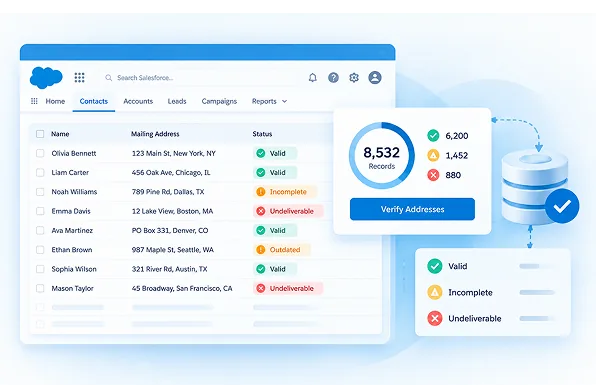
- Bulk verification of existing records
- Fewer returned mail pieces
- Cleaner territory and routing data
Where Bad Salesforce Data Comes From
Contact data starts decaying the day it is entered. Most bad records come in through six doors, and each one needs a check.
Web forms and Web-to-Lead
Typos, fake sign-ups and disposable email addresses arrive with every form submission and land straight in your lead queue.
List imports
Event lists, partner lists and old spreadsheets bring in addresses that bounce and phone numbers in a dozen formats.
Job changes
People change companies. Work emails stop working and phone numbers get disconnected or reassigned to someone else.
Manual entry
Reps type numbers and addresses the way they hear them, so the same data is stored five different ways.
Integrations and APIs
Marketing tools, enrichment apps and other systems push records into Salesforce without checking them first.
Moves and address changes
Customers move and offices relocate. Mail returns, parcels go missing and territory routing breaks.
Clean Salesforce Data in Real Time and in Bulk
Good Salesforce data cleansing tools do two jobs: stop new bad data at the door, and fix the bad data already inside.
Stop bad data at entry
Every new or updated record is checked before your team uses it, wherever it comes from.
- Leads, Contacts, Accounts and custom objects
- Web-to-Lead and Web-to-Case forms
- Records created by imports and API integrations
- Invalid or risky values flagged or blocked before they spread
Clean the backlog in one run
Verify the records you already have, then keep them clean automatically.
- Verify thousands of existing records at once
- Re-verify on a schedule as data ages
- Results saved on the record for reports and list views
- Send campaigns and calls only to verified contacts
Up and Running in Minutes
No complex setup. 100% inside Salesforce.

Install from AppExchange
One-click install from the Salesforce AppExchange. No additional software needed. Everything lives inside your existing Salesforce org.

Configure Your Rules
Select the objects, fields, triggers, and workflows you want to verify. Set up automation rules that match your Salesforce data model perfectly.

Verify & Stay Clean
Real-time verification begins immediately. Keep your CRM clean with automated verification on every new record and update.
Salesforce Validation Rules vs Data Validation Tools
Validation rules stop a value that looks wrong. They cannot tell you whether an email, number or address actually works. That is the gap Salesforce data validation tools fill.
| What you need | Salesforce validation rules | 360 Verify |
|---|---|---|
| Check the format of a value | ||
| Confirm an email address can receive mail | ||
| Detect disposable and risky emails | ||
| Identify phone line type and carrier | ||
| Standardize mailing addresses | ||
| Clean existing records in bulk | ||
| Re-verify data on a schedule | ||
| Setup effort | A formula for every field | Configure once from AppExchange |
Read: validation rules vs automated data validation tools →
See the difference in your own org
Install from AppExchange and verify your first records today. Free for 7 days.
Built for Every Team on Salesforce
360 Verify is a Salesforce data quality app built for marketing, sales, operations, admin and customer success teams. Sales teams rely on Salesforce lead verification to filter out fake sign-ups before they reach the pipeline. Admins and RevOps teams use Salesforce data quality tools to enforce consistent standards across all objects in one setup.
Clean Contact Data for Agentforce and AI Agents
AI agents act on whatever is in your CRM. If an email is dead or a number belongs to someone else, the agent gets it wrong, at scale.
- Agents only act on records that have been verified
- Undeliverable contacts are skipped, not emailed
- Scheduled re-verification catches job changes before the agent does
Illustration
Trusted by Salesforce Teams Worldwide
Built for Data Privacy and Compliance
Contact data is personal data. 360 Verify is designed to verify it without adding new places where it can leak.
Runs inside Salesforce
Installed from AppExchange and managed in your org, with no exports or spreadsheets to pass around.
Uses your Salesforce permissions
Profiles, permission sets and sharing rules decide who can run verification and see results.
Supports GDPR programs
Keeping contact data accurate is part of GDPR's accuracy principle. See our Salesforce email verification compliance checklist.
Start Verifying in Minutes – Free for 7 Days
No credit card. No complex integrations. Just clean data.
Frequently asked questions
-
Salesforce data cleansing tools find and fix invalid, outdated and badly formatted data in your org. 360 Verify is a Salesforce-native app that verifies email addresses, phone numbers and mailing addresses on new records and across existing ones.
-
Salesforce data verification checks that the email addresses, phone numbers and mailing addresses in your org are real and usable, not just correctly formatted. 360 Verify runs these checks and saves the result on each record.
-
Validation rules check that a value matches a format, such as an @ sign in an email. The data validation tools Salesforce teams actually need also verify that the value works: the mailbox exists, the phone number is active and the address is deliverable.
-
Yes. You can bulk-verify existing Leads, Contacts and Accounts in one run, then schedule re-verification so records are checked again as they age.
-
No. 360 Verify verifies emails, phone numbers and addresses. Deduplication is a separate step, and verified data makes duplicate matching more accurate.
-
Yes. 360 Verify checks email addresses and phone numbers submitted through Web-to-Lead and Web-to-Case, so fake and mistyped entries are flagged before they reach your team.
-
Most teams install 360 Verify from AppExchange, choose the objects and fields to verify, and start verifying in minutes. No code is needed.
-
Yes. 360 Verify offers a free 7-day trial on the Salesforce AppExchange.
-
Yes. AI agents act on the contact data in your CRM. Verifying that data first means agents email, call and route using records that have been checked.
Got a Question? Ask Us!
Ready to Solidify Your Digital Transformation Efforts Using Salesforce? Talk to Us!