

Salesforce Phone Number Verification: Why Line Type Matters

360 Degree Cloud
16 Jun 2026
Table of Contents
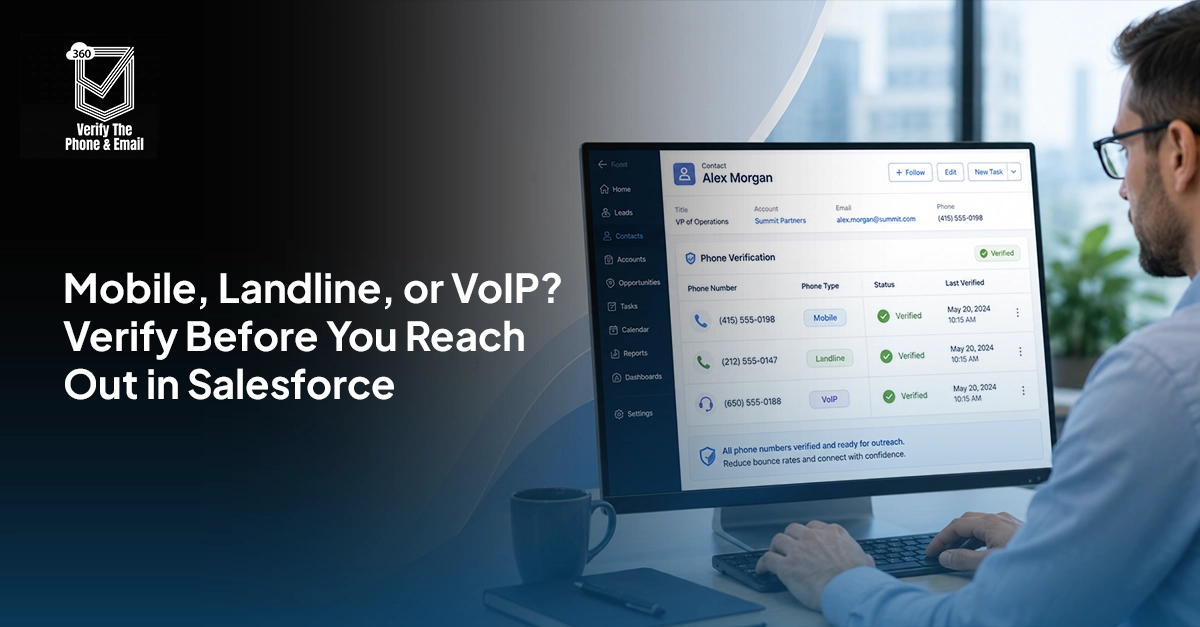
Salesforce phone number verification checks whether a contact number is valid, classifies it as mobile, landline, or VoIP, and routes it to the right outreach channel automatically. Without it, campaigns waste budget on numbers that can never receive an SMS or connect on a call. 360 VTM/VTP handles phone verification natively inside Salesforce, no data leaving your org.
Salesforce phone number verification helps teams identify whether a contact number is valid, reachable, and suitable for SMS or calling campaigns. Many campaigns fail because every phone number in Salesforce is treated the same. A correctly formatted number could still be a landline, VoIP number, or inactive contact that cannot receive an SMS.
By detecting mobile, landline, and VoIP numbers before outreach, businesses can improve segmentation, reduce failed attempts, and build more accurate campaign lists.
Carrier networks in many regions filter or silently drop SMS messages sent to landline numbers. This means your message is not just undelivered. It never generates a bounce or error in most platforms, making campaign failure invisible in your reports.
Table of Contents
What Is Salesforce Phone Number Verification?
Salesforce phone number verification is the process of checking a number stored on a Lead, Contact, Account, or custom Salesforce record against a phone verification service.
The verification process may return details such as:
- Whether the number is valid
- Its standardized international format
- Whether it is mobile, landline, or VoIP
- The associated carrier and country
- Whether the number is likely to support SMS
- When the number was last verified
Is your Salesforce phone data costing you campaign reach?
Clean, classified phone data drives better SMS delivery and fewer wasted calls.
The results are stored in Salesforce fields and used for campaign segmentation, lead routing, calling workflows, and data-quality reporting. This turns phone verification into more than a database-cleaning task. It becomes part of how sales and marketing teams decide who to contact and which channel to use.
Phone Validation vs. Phone Enrichment: What Is the Difference?
Phone Validation vs. Phone Enrichment
Salesforce phone validation usually checks whether a number follows the correct structure or numbering format.
Phone enrichment goes further. It adds telecom intelligence such as line type, carrier, country, and SMS capability on top of format validation.
A correctly formatted number is not always a usable number. That is why format-only checks fall short for businesses running high-volume messaging or calling campaigns. A number can pass a regex validation rule and still be a disconnected landline from three years ago.
In practice: validation tells you the number looks right. Enrichment tells you whether it will work.
Why Mobile, Landline, and VoIP Detection Matters
Every phone number should not enter the same outreach journey. Salesforce mobile number verification, landline detection, and VoIP classification help teams choose the right channel before starting a campaign.
Mobile Numbers Are Better Suited to SMS Campaigns
Mobile numbers are generally the most relevant for text messaging. Once the business has confirmed consent and opt-out status, verified mobile numbers can be added to an SMS campaign.
This improves targeting because Salesforce is no longer assuming that every number in the Phone field can receive a text message.
Landline Numbers Need a Different Outreach Route
Most traditional landlines cannot receive standard SMS messages. Sending text campaigns to these numbers can lead to failed delivery attempts and wasted messaging costs.
Salesforce landline detection allows teams to automatically:
- Exclude landlines from SMS campaigns
- Add them to a voice calling list
- Request an alternative mobile number
- Route the contact to email outreach
Some landline numbers can be text-enabled, so classification should guide routing rather than act as the only decision point.
VoIP Numbers Should Be Reviewed in Context
Salesforce VoIP detection identifies numbers connected through internet-based phone services.
A VoIP number does not automatically mean a lead is fake or low quality. Many legitimate companies use VoIP systems for everyday business communication.
However, non-fixed or easily created VoIP numbers may need additional review in fraud-sensitive or identity-sensitive workflows. VoIP classification should be combined with lead source, company data, engagement, and other quality signals.
Poor Phone Data Reduces Campaign Performance
Poor phone data affects much more than delivery rates. It creates problems across marketing, sales, and revenue operations.
Failed SMS Delivery
Invalid, inactive, or unsupported numbers reduce campaign deliverability. They can also make performance reports misleading because the campaign includes contacts who could never receive the message.
Wasted Outbound Calling Time
Sales representatives lose valuable time calling numbers that are disconnected or incorrectly entered. This lowers productivity and reduces the number of meaningful conversations they can complete.
Inaccurate Lead Scoring
A lead may appear qualified based on form activity or content engagement. However, if the phone number is invalid, the lead may not be as contactable as the score suggests.
Salesforce contact data validation allows phone quality to become an additional input in lead prioritisation.
Higher Campaign Costs
Businesses may pay messaging fees, calling costs, and representative time for outreach that had little chance of success. Verifying records before campaign entry reduces this unnecessary spend.
Weak Contact Segmentation
A standard phone field may contain mobile numbers, office landlines, virtual numbers, shared numbers, and incorrectly formatted entries.
Without phone type data, marketing teams cannot reliably build channel-specific audiences.
What Does Salesforce Phone Verification Check?
The exact results depend on the verification provider, but a complete process may check several phone attributes.
Phone Number Format
The number is cleaned and converted into a consistent national or international format. This reduces duplicate records caused by different versions of the same number.
Number Validity
The service checks whether the number follows a recognised numbering plan and whether it appears to be a usable telephone number.
A valid result does not always guarantee that the owner will answer or that every communication channel is supported.
Phone Line Type
The number is classified as mobile, landline, fixed VoIP, non-fixed VoIP, or another available category. This classification supports more accurate campaign routing.
Carrier Information
A phone carrier lookup in Salesforce may return the telecommunications provider associated with the number. Carrier data can support segmentation, regional routing, and troubleshooting when messages repeatedly fail.
Geographic Information
The lookup may identify the country, country code, or region associated with the number. Teams should not rely on this information as the user’s current physical location because people can move while keeping the same number.
SMS Eligibility
Some services may return information that helps determine whether the number is suitable for messaging.
SMS eligibility must still be combined with consent, opt-out status, quiet hours, and applicable communication regulations.
How Salesforce Phone Number Verification Works
Salesforce Phone Number Verification Workflow
A typical Salesforce phone number verification workflow follows a simple process.
- A phone number enters Salesforce through a form, import, integration, or manual update.
- A record-triggered Flow detects that the phone field has been created or changed.
- Salesforce sends the number to a verification application or telecom intelligence API.
- The service returns validity, carrier, line type, country, and other available data.
- Salesforce updates the corresponding verification fields.
- Campaign routing rules determine the next action.
For example:
- Verified mobile number: Add to an eligible SMS audience
- Valid landline: Route to a calling campaign
- Invalid number: Send to a data correction workflow
- VoIP number: Continue or review based on business rules
- API error: Add to a retry queue
This Salesforce phone number validation automation allows teams to act on phone intelligence without manually reviewing every record.
How to Automate Phone Verification in Salesforce
1. Create Phone Verification Fields
Start by creating fields that can store and organise the verification response.
Useful fields include:
- Phone Verification Status
- Normalised Phone Number
- Phone Line Type
- Carrier Name
- SMS Eligibility
- Phone Country
- Last Verified Date
- Verification Error
Use picklists for statuses and line types so the data remains consistent and easy to segment.
2. Connect a Phone Validation Service
Connect Salesforce with a verification application or Salesforce phone validation API.
The integration should securely send the phone number, receive the result, and map the response to the correct Salesforce fields.
The setup should also account for API limits, authentication, errors, unsupported countries, and bulk record processing.
3. Build a Record-Triggered Salesforce Flow
Create a Flow that runs when a phone number is added or updated.
The Flow should:
- Confirm the phone field is not blank
- Check whether the number has changed
- Submit the number for verification
- Update the verification fields
- Record the verification date
- Route failed requests for retry
Avoid running the verification repeatedly when the phone number has not changed.
4. Create Campaign Routing Rules
Use the returned data to control campaign entry.
For example, an SMS campaign may require:
- Verification Status = Valid
- Phone Line Type = Mobile
- SMS Eligible = Yes
- SMS Consent = Yes
- Opt-Out Status = No
A voice campaign may include valid mobile, landline, and approved VoIP numbers while excluding invalid records.
5. Monitor Phone Data Quality
Create Salesforce reports and dashboards to track:
- Percentage of valid numbers
- Invalid numbers by lead source
- Mobile, landline, and VoIP distribution
- Records awaiting verification
- Verification API errors
- SMS delivery by phone type
- Changes in invalid number rates
When Should You Reverify Existing Phone Records?
Reverification is one of the most overlooked parts of phone data management. Numbers get reassigned, deactivated, or ported to different carriers over time, sometimes within months of first being captured.
A practical reverification schedule to follow:
- Any record where the phone field was updated should trigger immediate reverification through a record-triggered Flow.
- Records not verified in the last 6 to 12 months should enter a scheduled bulk reverification queue.
- High-value accounts and named contacts may warrant more frequent checks given their role in pipeline activity.
- After any large data import, run bulk verification before allowing records to enter active campaigns.
360 VTM/VTP handles bulk phone verification natively inside Salesforce, so reverification runs can be scheduled without exporting data to a third-party tool.
Best Practices for Salesforce Phone Validation
How often should you reverify phone numbers in Salesforce?
360 VTM/VTP supports scheduled bulk reverification so your records stay accurate without manual effort.
Salesforce phone validation works best when it is built into your data and campaign workflows. These practices help keep verification results accurate, actionable, and aligned with consent requirements.
- Verify phone numbers before adding contacts to SMS, calling, or other high-volume campaigns.
- Reverify a number whenever the phone field is edited or replaced.
- Keep phone validity, SMS eligibility, consent, and opt-out status in separate Salesforce fields.
- Use VoIP classification as a supporting risk or quality signal, not an automatic reason to reject a lead.
- Store the last verification date so teams know when the phone data may need to be checked again.
- Send API timeouts, unknown responses, and failed lookups to a retry or manual review queue instead of marking them invalid.
Conclusion
Good campaign performance depends on more than having a large contact database. The numbers inside that database must be valid, correctly classified, and matched with the right outreach channel.
Mobile detection can improve SMS targeting, landline detection can prevent avoidable delivery failures, and VoIP intelligence can support better routing and risk decisions. When these checks are connected with Salesforce Flow, verification becomes part of the campaign process rather than a separate data-cleaning task.
With automated Salesforce phone number verification, businesses can improve contact segmentation, reduce wasted outreach, increase campaign efficiency, and give marketing and sales teams more confidence in every number they use.

Solve It with Salesforce. We’ll Show You How.
AI. Apps. Experts. Everything you need to win with Salesforce under one roof.Frequently Asked Questions
What is Salesforce phone number verification?
Salesforce phone number verification checks whether a number is valid, correctly formatted, and suitable for calling or messaging. It can also return carrier, country, and line-type information.
Can Salesforce validate phone numbers natively?
Salesforce can check phone formatting through validation rules, formulas, and Flow. For complete Salesforce phone validation, businesses usually need a verification app or external API.
Can Salesforce detect mobile, landline, and VoIP numbers?
Yes. Salesforce mobile number verification, Salesforce landline detection, and Salesforce VoIP detection can be enabled through a telecom intelligence service or phone validation API.
How does Salesforce phone number validation automation work?
Salesforce phone number validation automation uses Flow or an integrated app to verify a number when it is added or changed, update the record, and trigger campaign routing rules.
Why is phone number classification important for SMS campaigns?
Phone classification helps identify which contacts are likely to support SMS. It improves Salesforce SMS verification workflows, reduces failed messages, and supports better campaign segmentation.
About the author
Editorial TeamThe Editorial Team at 360 Degree Cloud brings together seasoned marketers, Salesforce specialists, and technology writers who are passionate about simplifying complex ideas into meaningful insights. With deep expertise in Salesforce solutions, B2B SaaS, and digital transformation, the team curates thought leadership content, industry trends, and practical guides that help businesses navigate growth with clarity and confidence. Every piece we publish reflects our commitment to delivering value, fostering innovation, and connecting readers with the evolving Salesforce ecosystem.
Recent Blogs
 360 Verify the Mail
Agentforce Data Quality: Why AI Agents Fail on Bad Contact Data
Summary Agentforce data quality is the single most overlooked prerequisite for any AI deployment on Salesforce. Agentforce does not fix your data — it acts…
Read More 360 Verify the Mail
Verify a Prospect’s Phone Number Before You Call
Bad phone data quietly kills sales campaigns before a single rep picks up the phone. This blog walks through seven checks every sales team should…
Read More 360 Verify the Mail
Best Salesforce Data Quality Tools 2026
Picking the right Salesforce data quality tools isn’t a one-time decision. This guide breaks down six tools that tackle verification, deduplication, and ongoing data hygiene…
Read MoreReady to Make the Most Out of Your Salesforce Instance?
Our Salesforce aces would be happy to help you. Just drop us a line at contact@360degreecloud.com, and we’ll take it from there!
Subscribe to our newsletter
Stay ahead with expert insights, industry trends, and exclusive resources—delivered straight to your inbox.
