

How to Send Mass Email from Salesforce Lightning? Let’s Find Out – 360 Degree Cloud

360 Degree Cloud
25 Mar 2026
Table of Contents
“Email delivers the highest ROI of any marketing channel—$36 for every $1 spent.”
Whether you are a Salesforce admin trying to alert 6000 users about a system update or a B2B marketer launching a product campaign to 10,000 prospects, one thing is for sure— mass emailing from Salesforce should be simple. But it’s not.
Salesforce Lightning doesn’t support true mass email at scale unless you pay for an add-on or find a workaround. And that becomes a real problem when your campaign needs:
- More than 500 recipients per email
- More than 5,000 emails/day across your org
- Personalization beyond the basics
- Reporting on opens, clicks, and bounce rates
- Compliance with GDPR or CAN-SPAM
So how do successful teams get around these limitations and still run impactful, compliant email campaigns inside Salesforce? That’s exactly what we are diving into—common pitfalls, smarter workarounds, and how 360 Mass Mailer makes it all frictionless.
Table of Contents
What is Mass Emailing in Salesforce Lightning?
In Salesforce Lightning, a mass email refers to the ability to send one email template or an individual copy of an email to a group of people using list email and mass email. However, this doesn t mean you can bombard your contact with thousands of emails with a single click. Native capabilities come with tight restrictions. Mass email in Salesforce falls into two broad categories:
- List Emails sent directly to records from a list view
- Campaign Emails sent to members of a campaign
Now if you are wondering why Salesforce imposes such limits, there are multiple reasons, like preventing spam and IP blacklisting, protecting shared infrastructure and deliverability, and pushing enterprise users to premium email products like Marketing Cloud or Marketing Cloud Account Engagement (formerly known as Pardot).
Don’t let Salesforce limits stall your email campaigns. Want to fix it?
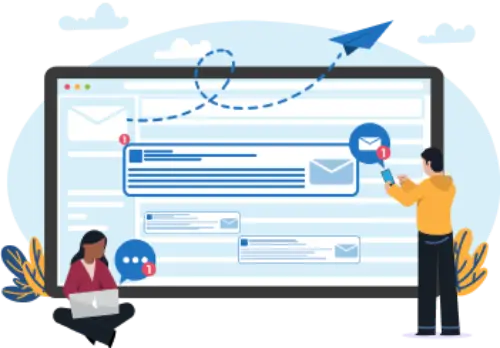
What is Mass Emailing in Salesforce Lightning?
Your most powerful asset lives in Salesforce, which is customer data. So naturally, teams want to use it to drive timely, targeted communication. And not just to a handful of people.
You can send mass emails from Salesforce Lightning, but there are limitations. Salesforce s native functionality allows you to send emails to a list of recipients, such as leads, contacts, or campaign members. But the daily email sending limit can prove to be restrictive, and lack of automation and personalization can also reduce the efficacy of email marketing campaigns.
To send a mass email through Salesforce, you’ll typically follow these steps:
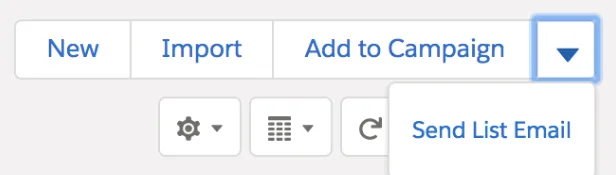
1. Create or Select a List of Recipients: To identify your target audience, you need to create a list of recipients for more targeted campaigns.
2. Compose the Email: Use the email composer from Salesforce to compose your email. This includes body content, subject, and any attachments that you may wish to append to the email.
3. Send Emails in Batches: Any mass email usually works in batches due to Salesforce s daily email sending restrictions.
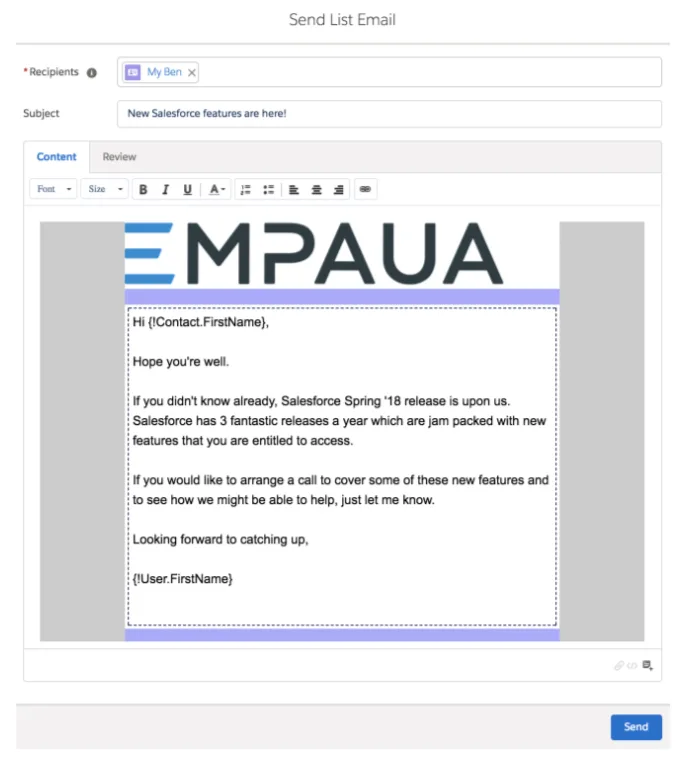
Despite email-sending ability, this process may not easily apply to a large number of email recipients or automated email marketing messages because of the Mass Email Salesforce constraints in terms of sending capacity and automation.
Wondering how to send mass emails using Salesforce Apex?

1. Scalability is Very Limited: If you are working at a large enterprise and need to reach thousands of leads at once, Salesforce s built in functionalities might hold you back. Here s how:
- Max 500 recipients per List Email
- Max 5,000 emails/day per org (varies by edition)
- No bulk email scheduling without custom Flow/Process Builder setups
- Can t send email to custom objects or related records without workarounds
2. Personalization Capabilities are Basic Modern email marketing efforts demand contextual, personalized content that adapts to each user s behavior and attributes. Unfortunately, Salesforce s native email tool doesn t go that far.
- Only basic merge fields like {!FirstName} or {!Company} supported
- No conditional logic or dynamic content sections
- Can t tailor messages based on user behavior or CRM stage
- All recipients receive the exact same content—hurting engagement
3. Weak Analytics & Reporting You can t improve what you can t measure. Tracking the success of email campaigns is crucial, but Salesforce s native tools offer very limited insights. Here s how:
- No native support for click-through rate (CTR), bounce rate, or delivery reports
- Open tracking is only available via read receipts (and not reliable)
- No engagement heatmaps, link tracking, or campaign performance comparisons
- No integration with Google Analytics or UTM parameters without third party tools
4. No Native Automation or Drip Workflows If you want to build automated journeys like welcome emails, lead nurturing, or re engagement sequences, Salesforce Lightning falls short in that category.
- No built in drip campaign functionality
- No behavior triggered automations (e.g., send email after form submission)
- Can t schedule follow ups or create email sequences without external apps
- Manual sending creates delays, errors, and workload strain
5. User Experience and Workflow Complexity Even for basic mass emailing, users often find the process unintuitive and time consuming.
- Steep learning curve for new users
- Limited documentation on advanced email use cases
- Requires jumping between list views, campaigns, and templates
- Manual sending increases human error and inconsistency
For example, a B2B company attending Dreamforce collects 9,300 leads from booth scans and webinar signups.
Their Salesforce team builds a follow up campaign—but finds out they can only send to 500 recipients per email, with a max of 5,000/day across the entire org. They re forced to:
- Manually split the lists
- Copy paste the same message 18 times
- Lose personalization consistency
- Get zero reporting on opens, clicks, or bounce rates
They miss the 48-hour follow up window. Engagement plummets. And their Salesforce campaign dashboard shows… nothing.
Scale campaigns & engage prospects effectively with 360 Mass Mailer!
Overcoming Salesforce’s Limitations Using 360 Mass Mailer
360 Mass Mailer is an app native to Salesforce that also aims to remove the constraints imposed by the use of mass emailing through Salesforce. It automates email marketing, which are functions that are not natively offered by Salesforce and so are crucial for companies that heavily use email marketing. Here s how you can boost your email operations with 360 Mass Mailer:
- Unlimited Email Sending: Free yourself from the rigid constraints of mass email limits in Salesforce. This mailing list application means you can send as many emails as you want on a daily basis with the additional bonus of not having restrictions and therefore expands your opportunity to reach many people. This capability enables you to effectively deploy large scale email campaigns and connect swiftly with audiences.
- Automated Email Journeys: Easily reduce follow up, lead nurturing, and follow up email efforts with automation. With 360 Mass Mailer, the leads and customers remain engaged at the right time with the relevant messaging they need throughout the cycle. That is why automation is useful because it reduces steps in order to create quality, well-constructed relationships.
- Pre-Built Email Templates: Easily run multiple types of campaigns faster with templates prepared for you that can fulfill a range of crucial campaign requirements. Whether for a promotion, an update, or anything related to customers, there is always a template ready in 360 Mass Mailer, which can be changed to suit your needs. Hence, you launch more effective campaigns.
- Personalization: Increase engagement by sending highly personalized emails. Infact, around 71% of customers expect personalization. With 360 Mass Mailer, segment your audience and send emails that resonate with their needs. With such an approach, one can ensure your messages resonate with the audience, resulting in better responses and a higher return on investment for your campaigns.
- Salesforce-Native Integration: Save time with seamless Salesforce integration. 360 Mass Mailer helps manage all your email marketing data in the Salesforce environment so that no other tool is needed. This integration would improve data accuracy, reduce data related processes, and present a centralized viewpoint of marketing and sales.
In contrast to email solutions that operate within the confines of or around Salesforce, 360 Mass Mailer becomes an extension of your Salesforce environment. This guarantees that data integrity is achieved, the procedure of working is made less complicated, and, in addition, has the advantage of being the most scalable. This app is flexible enough to expand for small campaigns, and it is equally flexible enough to expand for handling thousands of prospects.
At 360 Degree Cloud, we built 360 Mass Mailer to solve a challenge we saw across hundreds of Salesforce implementations—email at scale was either clunky, expensive, or outside the platform. With this app, we brought high-performance, personalized, and compliant mass emailing right inside Salesforce, so teams can focus on results, not restrictions.
– Siddharth Sehgal, CEO, 360 Degree Cloud

Check out what people are actually saying about 360 Mass Mailer on AppExchange!
Real-World Use Cases of 360 Mass Mailer
Here are some use cases that will help you understand how 360 Mass Mailer helps in real world.
| Scenario | How 360 Mass Mailer Helps |
| Webinar Invitations | Segment by industry, send to 10K+ recipients, track RSVPs and reminders all native to Salesforce. |
| Drip Onboarding Sequence | Auto send welcome → tutorial → feedback emails based on sign up date and user behavior |
360 Mass Email has completely transformed the way we handle our email marketing within Salesforce. The ability to send personalized, unlimited bulk emails with real time performance tracking has been a game changer for our campaigns. Automation features have significantly boosted our engagement and saved us countless hours. It s truly an all in one solution for anyone looking to scale their marketing efforts seamlessly.
-Matt Harold, Vision’s Tech
Ready to install it today?
The Bottom Line
The ability to send mass email through Salesforce Lightning is present but frequently hindered by aspects such as daily email sending quotas and more. These limitations can be hugely problematic in terms of scaling up campaigns while ensuring that the communication remains relevant to individuals. By using 360 Mass Mailer, there are no such issues, and you can dramatically change your approach to e-mail marketing.
As features include unlimited email sending, the possibility of segmentation, journey automation, and real time analytics, 360 Mass Mailer aids businesses in maximizing campaign speed, increasing engagement, and achieving higher conversion levels. The main principle of many designers is its Salesforce native integration makes it a perfect tool for businesses that expect to make the most of their email marketing
potential.
Want to automate drip campaigns and drive up to 29.8% higher conversions?

Solve It with Salesforce. We’ll Show You How.
AI. Apps. Experts. Everything you need to win with Salesforce under one roof.Frequently Asked Questions
Can we send more than 5000 emails in Salesforce?
Not with Salesforce’s native tools, as they impose strict daily limits. However, with 360 Mass Mailer, you can send unlimited emails directly from Salesforce.
How can I send mass emails at once?
You can use 360 Mass Mailer to send bulk emails instantly. It simplifies automation, email personalization, and outreach methodologies.
How to increase the limit while sending mass email through Salesforce?
To bypass Salesforce’s daily email limits, integrate 360 Mass Mailer. It removes these restrictions while enhancing your email marketing capabilities.
Is Salesforce Mass Email compliant with GDPR and CAN-SPAM?
Not by default. Salesforce native emails don’t include built-in consent tracking or unsubscribe management. To ensure compliance with GDPR and CAN-SPAM, it’s recommended to use apps like 360 Mass Mailer that come with native opt-out management, consent fields, and compliance-ready templates.
Can I track opens, clicks, and bounce rates in Salesforce mass emails?
Salesforce’s built-in email tools offer very limited analytics—often just basic open tracking. For full visibility into performance (like opens, click-throughs, and bounce rates), you’ll need an advanced tool such as 360 Mass Mailer, which provides real-time engagement analytics right inside Salesforce.
About the author
Editorial TeamThe Editorial Team at 360 Degree Cloud brings together seasoned marketers, Salesforce specialists, and technology writers who are passionate about simplifying complex ideas into meaningful insights. With deep expertise in Salesforce solutions, B2B SaaS, and digital transformation, the team curates thought leadership content, industry trends, and practical guides that help businesses navigate growth with clarity and confidence. Every piece we publish reflects our commitment to delivering value, fostering innovation, and connecting readers with the evolving Salesforce ecosystem.
Recent Blogs
 Comparison
7 Best Pardot (Account Engagement) Alternatives for Salesforce Teams in 2026
Paying $1,250 a month for Pardot when your team mostly sends newsletters, bulk emails, and follow-ups? You might be paying for far more marketing automation…
Read More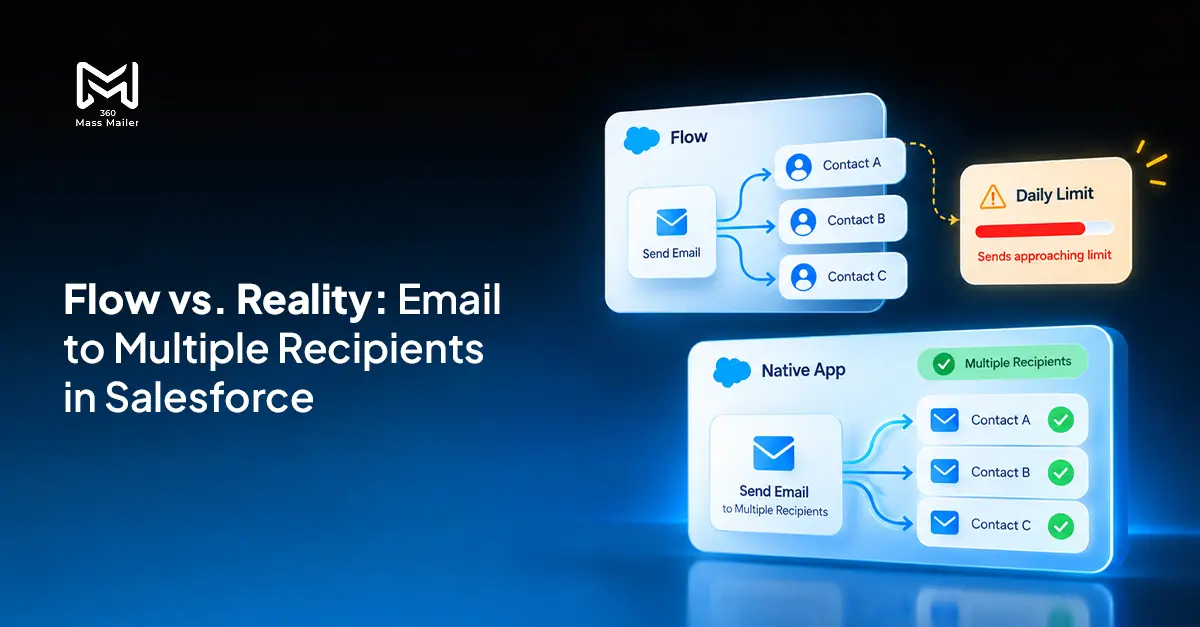 Email Marketing
Send Email to Multiple Recipients in Salesforce Flow: What Works and Where It Breaks
You’ve got a Flow that fires on a record update. You need it to send email to multiple recipients in Salesforce. The logic seems simple:…
Read More Comparison
7 Best Drip Campaign Tools for Salesforce in 2026: Features, Limits, and Pricing Compared
Most comparisons of the best drip campaign tools for Salesforce make the same mistake: they treat native tools and connected tools as if they’re interchangeable.…
Read MoreReady to Make the Most Out of Your Salesforce Instance?
Our Salesforce aces would be happy to help you. Just drop us a line at contact@360degreecloud.com, and we’ll take it from there!
Subscribe to our newsletter
Stay ahead with expert insights, industry trends, and exclusive resources—delivered straight to your inbox.
